
Financial Learning Experience (FLEX®) - FAQ
- I am the SAA and I cannot see the FLEX link listed on my Quick Links in FINRA Gateway. How do I get access to FLEX?
To add entitlements to FLEX, go to edit entitlements on the User Account Settings page, then find FLEX on the last privilege available to select on the list. Refer to the Accessing FLEX on the FINRA Gateway quick reference guide.
- I just want to look at the FLEX catalog. How do I access the catalog?
To access the FLEX catalog, first, you would need entitlements to FLEX granted by your firm’s SAA. Once granted access, you can preview the catalog using the link on the FLEX Dashboard. Refer to the Accessing the FLEX Catalog user guide.
- I only want to take the courses from the FINRA Crypto and Blockchain Education Program. What type of license should I get?
The library license is the most cost-effective choice if you want to take the FINRA Crypto and Blockchain foundational pathway since there are six total courses that have to be completed in sequence.
- I just uploaded the course assignment template but I didn’t get any acknowledgment that it has been received. How do I find out if my assignment went through?
You would see the message “Success” on the bottom of the drop box that indicates your assignment went through (see screen shot below).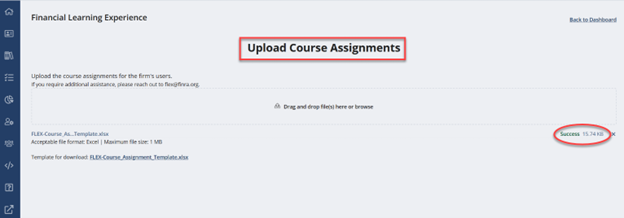
Please email [email protected] if you still need confirmation that your assignments were processed successfully.
- How do I run the completion report for my learners’ assignments?
Once you upload course assignments, the course completion report will be emailed to you the next Monday after the upload and every week thereafter. Please contact the FLEX team at [email protected] if you want to receive the report on different days or in a different cadence.
- How do I add or remove learners from my firm’s assignment?
To add learners, you can upload their user information followed by their course assignment through your FLEX platform directly. Refer to the Uploading Users guide for more information. To remove learners, please contact the FLEX team at [email protected].