
Account Holder Type Consistency Interactive Report Card
Overview
The Consolidated Audit Trail (CAT) is a comprehensive regulatory utility that facilitates efficient and accurate tracking of all order lifecycle activity in National Market System (NMS) securities (i.e., equities and listed options). Members of a national securities exchange or a national securities association (together Industry Members) have an obligation to report relevant order lifecycle information to CAT as outlined in CAT technical specifications and guidance.
FINRA monitors its members’ compliance with CAT reporting obligations, including the integrity and consistency of data submitted to the CAT transaction database. Two important CAT data elements are (1) the Firm Designated Identifier (FDID), which is a unique and persistent identifier for each trading account designated by Industry Members for purposes of providing data to CAT; and (2) the Account Holder Type (AHT), which reflects the type of beneficial owner of the account (e.g., Individual Customer, Proprietary). Industry Members must report FDID and AHT on several CAT record types, described below. The accurate and consistent relationship between FDID and AHT facilitates the broad array of regulatory activities FINRA performs to ensure market integrity and investor protection.
The AHT Consistency Interactive Report Card facilitates member visibility of instances where reported AHTs are not consistent for a unique FDID on reported CAT records. As each FDID represents a unique trading account, the beneficial owner of the account, as represented by the AHT, must be consistent each time an FDID is reported to CAT. This Interactive Report Card highlights instances where an Industry Member reports conflicting AHTs on CAT records from an FDID.
How it Works
The AHT Consistency Interactive Report Card evaluates CAT record types that require an Industry Member to identify a unique account with an FDID and the type of beneficial owner of that account with the correct AHT.
The relevant CAT record types are as follows:
| Equity event types (event type codes) | New Order (MENO) |
| Post-Trade Allocation (MEPA) | |
| Amended Allocation (MEAA) | |
| Options event types (event type codes) | New Order (MONO) |
| Post-Trade Allocation (MOPA) | |
| Amended Allocation (MOAA) | |
| Multi-Leg event types (event type codes) | New Order (MLNO) |
Each of these CAT records, when submitted correctly, contains an FDID and an AHT that represents the type of beneficial owner of the account: (i) for which an order is received or originated; (ii) to which shares/contracts are allocated; (iii) against which a customer/client order is being filled; or (iv) that originated the relevant quote.
CAT Industry Member Technical Specifications define allowable Account Holder Type values as follows:
| A | Institutional Customer – An institutional account as defined in FINRA Rule 4512(c) |
| E | Employee Account – An employee or associated person of the Industry Member or an employee or associated person of affiliated group companies |
| F | Foreign – A non-broker-dealer foreign affiliate or non-reporting foreign broker-dealer |
| I | Individual Customer – An account that does not meet the definition of “institution” as defined in FINRA Rule 4512(c) and is also not a proprietary account. |
| O | Market Making – See CAT FAQ C5 and CAT FAQ B68 |
| V | Firm agency average price account |
| P | Other Proprietary |
| X | Error Account – Error account of the firm |
Each business day, on a delayed—trade date plus one business day (T+1)—basis, FINRA evaluates the CAT records attributable to a member firm that contain FDIDs and AHTs. Within each Industry Members’ relevant CAT records, FINRA isolates the submitted FDID and evaluates the associated AHTs. FINRA then isolates a group of CAT records associated with an FDID where at least one of the CAT records contains an AHT that is inconsistent with the AHT on other reported CAT records.
For example, for a specific business day (e.g., January 2, 2025), Member XYZ (CRD #1111) submits a CAT MENO event for FDID “FDID2222” with an “A” AHT and a CAT MEPA event for the same FDID “FDID2222” with a different AHT value of “F.” In this instance, FINRA would generate a record that reflects the AHT inconsistency for FDID “FDID2222.” This instance, if exported from the Interactive Report Card, would appear as follows:
Firm CRD Number | Trade Date | Firm Designated ID | Count – A: Institutional | Count – E: Employee | Count – F: Foreign | Count – I: Individual | Count – OPVX: Market Making/Proprietary |
1111 | 1/2/25 | FDID2222 | 1 | 0 | 1 | 0 | 0 |
Important Notes
- For the purpose of the AHT Consistency Interactive Report Card, FINRA considers AHTs “O, P, V, X” collectively as member market maker or proprietary account holder types, and will not identify an inconsistency where the AHTs associated with an FDID is different within that group of AHTs; and
- the AHT Consistency Interactive Report Card currently examines AHT consistency within the relevant CAT records for one business day and therefore will not identify Account Holder Type inconsistencies across multiple business days.
Features and Tools
This Interactive Report Card offers members timely insight into Account Holder Type inconsistencies. As outlined below, this Interactive Report Card has the following functionality:
- Customizable Date Ranges
- Track and Trend Visuals: Peer Ranking and Daily Output Charts
- FDID drill-down research capability
- Export to CSV
- Self-Set Notifications
- Machine-to-machine daily data capabilities
Customizable Date Ranges
The top left of the interactive report card allows members to customize the date range. The default Begin Date is the first day of the previous full month and the Default End Date is the current day. For example, a member accessing the interactive report card on Tuesday, October 14, 2025, would see a default Begin Date of September 1, 2025, and a default End Date of October 14, 2025. The Begin and End Date dynamically drive the contents of interactive visualizations in the remainder of the Interactive Report Card.

Track and Trend – FDID Non-Compliance Rate vs Peer Firms
For the purposes of this Interactive Report Card, each member’s daily FDID non-compliance rate is calculated as the number of FDIDs a member has submitted to CAT that have an AHT inconsistency over the total number of FDIDs a member submitted to CAT.

Of note, both numbers are based on the number of FDIDs reported, regardless of how many individual CAT records that contain that FDID were reported for that day.
FINRA uses each member’s FDID Non-Compliance—together with the Peer Ranking methodologies outlined below—to generate the following visualization of a member’s performance as it relates to peer members:
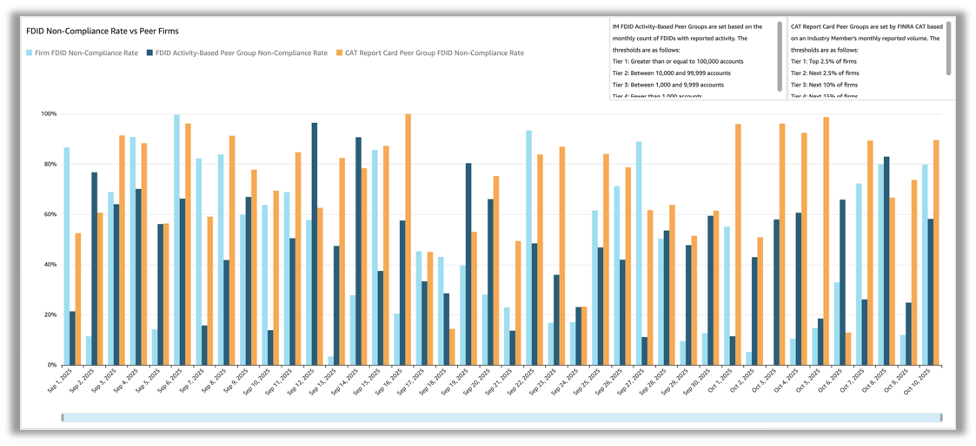
The FDID Non-Compliance Rate vs. Peer Firms visualization (Peer Rank Chart) represents the members on Non-Compliance Rate each day as compared to its peers when calculated using two peer ranking methodologies: (1) a member’s FDID Activity; and (2) a member’s CAT reporting activity.
First, the FDID Activity based peer ranking methodology places a member in one of four peer ranking tiers based on the number of FDIDs a member reports to CAT monthly. Specifically, notwithstanding the number of CAT Records a member reports over a month, this methodology counts the unique FDID’s a member submits over a month in the following four tiers:
- Tier 1: Greater than or equal to 100,000 unique FDIDs
- Tier 2: Between 10,000 and 99,999 unique FDIDs
- Tier 3: Between 1,000 and 9,999 unique FDIDs
- Tier 4: Fewer than 1,000 unique FDIDs
Segmenting members according to their FDID activity levels seeks to provide members relevant benchmarking data that facilitates comparison of each members reporting metrics against other members with similar operational scale and complexity related to the number of FDIDs.
Second, the Interactive Report Card leverages the FINRA CAT Report Card Peer Groups based on the volume of monthly reported CAT Record to place members in the following six tiers:
- Tier 1: Top 2.5 percent of firms
- Tier 2: Next 2.5 percent of firms
- Tier 3: Next 10 percent of firms
- Tier 4: Next 15 percent of firms
- Tier 5: Next 20 percent of firms
- Tier 6: Remaining 50 percent of firms
CAT Report Card Peer Groups are classification categories FINRA CAT established to facilitate meaningful comparisons among similar firms. These peer groups are specifically determined based on monthly reported record volume to the CAT system. More information on the FINRA CAT report cards and associated terms is available on catnmsplan.com in the Industry Member Compliance Glossary.
Zooming in on an individual day, October 10, 2025, the Peer Rank Chart gives a member information about its performance against the members in its peer groups; the chart below shows group 2 in both the FDID Activity-Based peer group and CAT Report Card peer groups:
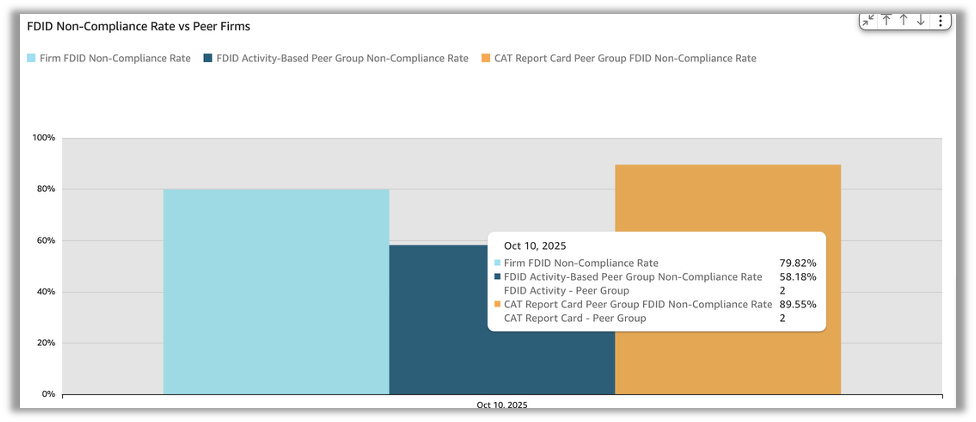
This peer group structure helps contextualize a member’s performance to better understand its relative performance in terms of data quality, reporting accuracy and compliance with CAT reporting requirements.
Track and Trend – Daily Count
The AHT Interactive Report Card also provides a visualization of a member’s daily count of FDIDs with differing AHTs:
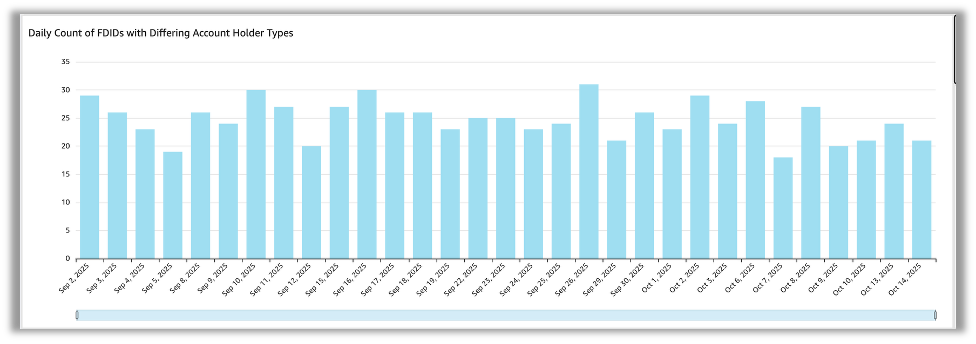
This visualization represents the count of FDIDs in a member’s CAT submissions that have an AHT inconsistency each day. As this visualization focuses on a member’s own activity, it facilitates tracking and trending compliance with the AHT consistency expectations, assists in identifying spikes or anomalous activity, and—after remedial action is taken—provides confirmation that the remedial action has taken effect. Further, this chart is interactive with the FDID Drill Down tools discussed below. Specifically, when a member selects the output from a specific day, the FDID Drill Down tool refreshes to include only the FDIDs from that specific day.
FDID Drill Down Tools
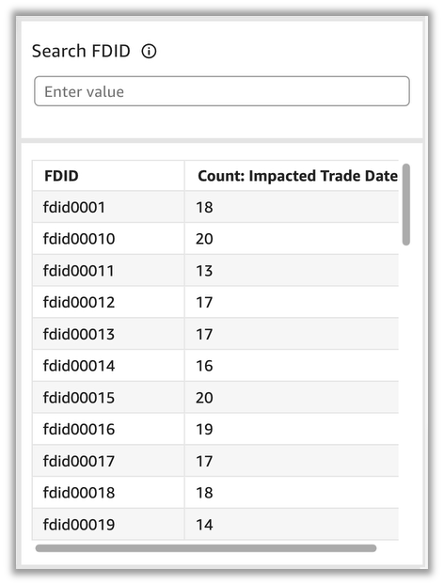
The AHT Interactive Report Card provides members the ability to analyze—at an FDID level—the differing AHTs reported for a specific FDID. Specifically, the Search FDID tool has two components: (1) a search bar that permits a member to enter an FDID and receive details regarding how many trade dates between the Begin and End date the entered FDID had AHT inconsistencies; and (2) a table that contains all FDIDs with AHT inconsistencies from the Begin date to the End date, and a count of how many trade dates between the Begin and End date the relevant FDID had AHT inconsistencies. From the table of FDIDs below, a member can select a single FDID, which will open an FDID Detailed Data visualization.
Once selected, the FDID Detailed Data visualization populates information about the relevant FDID:
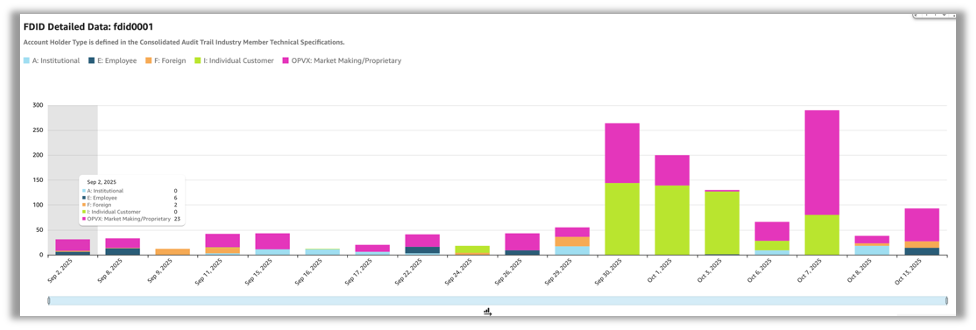
As pictured, the FDID Detailed Data visualization presents the AHT activity for a specific FDID between the Begin and End date. Different AHTs are color coded in stacked bar charts, and hovering over an individual bar will reveal the counts of individual AHTs for that FDID for that day.
Export to CSV
The Download to CSV function facilitates member firm analysis outside the Interactive Report Card. For example, when facilitating internal root cause analysis or enriching Report Card data within additional member specific information to facilitate analysis.
To access the export to CSV function, please select the Export to CSV button at the top of the AHT Interactive Report Card.
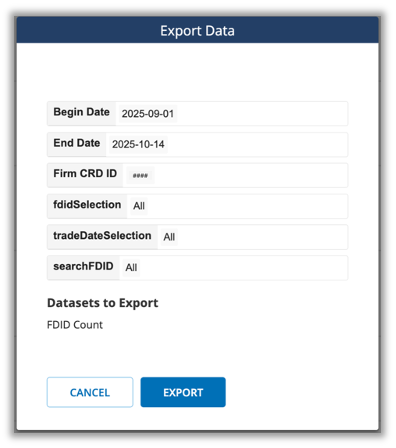
Once selected, a dialog box will appear showing the selected filters based on the user’s current dashboard settings. The date range and FDID selection can be updated within the dialog. A single dataset is available for export, FDID Detailed Data. For each trade date and FDID with inconsistencies, the dataset will contain a row with the count of records containing each account holder type.
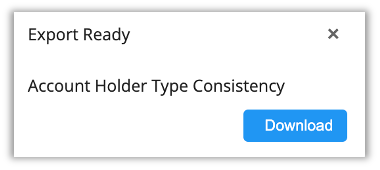
To download the dataset, click the Export button in the bottom right of the dialog box. You will see an Export Queued dialog in the bottom right of the screen. Once the processing is complete, select download to save a downloadable .zip file to your machine. These files are also available for download in the Exports tab after processing.
The download is a .zip folder that contains two Comma Separated Value (CSV) files: (1) a “manifest” file that describes the details of the export (e.g., begin date, end date, firm CRD); and a “FDID Count” file that contains the following information:
| Field | Content |
|---|---|
| Firm CRD Number | The unique number associated with the broker dealer member in FINRA’s Central Registration Depository (CRD). |
| Trade Date | Trade Date for Industry Member is defined as beginning immediately after 23:59:59.999999 ET on Trade Date T - 1 and up to 23:59:59.999999 ET of the next Trade Date T. Weekends and holidays are not considered a Trade Date. An event occurring on a weekend or holiday will be assigned to the next Trade Date. |
| Firm Designated ID | FDID is defined in Section 1.1 of the CAT NMS Plan as "a unique and persistent identifier for each trading account designated by Industry Members for purposes of providing data to the Central Repository.” |
| Count - A: Institutional | A count of all CAT records submitted for the relevant FDID that include AHT A: Institutional – an institutional account as defined in FINRA Rule 4512(c). |
| Count - E: Employee | A count of all CAT records submitted for the relevant FDID that include AHT E: Employee – an employee or associated person of the Industry Member or an employee or associated person of affiliated group companies. |
| Count - F: Foreign | A count of all CAT records submitted for the relevant FDID that include AHT F: Foreign – a non-broker-dealer foreign affiliate or non-reporting foreign broker-dealer. |
| Count - I: Individual | A count of all CAT records submitted for the relevant FDID that include AHT I: Individual – a person that does not meet the definition of “institution” as defined in FINRA Rule 4512(c) and is also not a proprietary account. |
| Count - OPVX: Market Making/Proprietary | For the purpose of the Account Holder Type Consistency Interactive Report Card, FINRA considers AHTs “O, P, V, X” collectively as member market maker or proprietary account holder types, and will not identify an inconsistency where the AHTs associated with an FDID is different within that group of AHTs. However, where a CAT Record (s) submitted for an FDID includes AHTs outside of O, P, V, X on a specific Trade Date, this field will include a count of the CAT records that contain AHT O, P, V, X. O Market Making – See CAT FAQ C5 and CAT FAQ B68 V Firm agency average price account P Other Proprietary X Error Account – Error account of the firm |
Self-Set Notifications
As a supplement to track and trend-visuals described above, FINRA offers a self-set notification feature that empowers individual users to customize when and how they engage with the interactive report card based on their specific roles and needs.
How to Set Up Notifications
From within the AHT Consistency Interactive Report Card, navigate to “Self-Set Notifications” in the top banner and select “Add Notification Rule.”
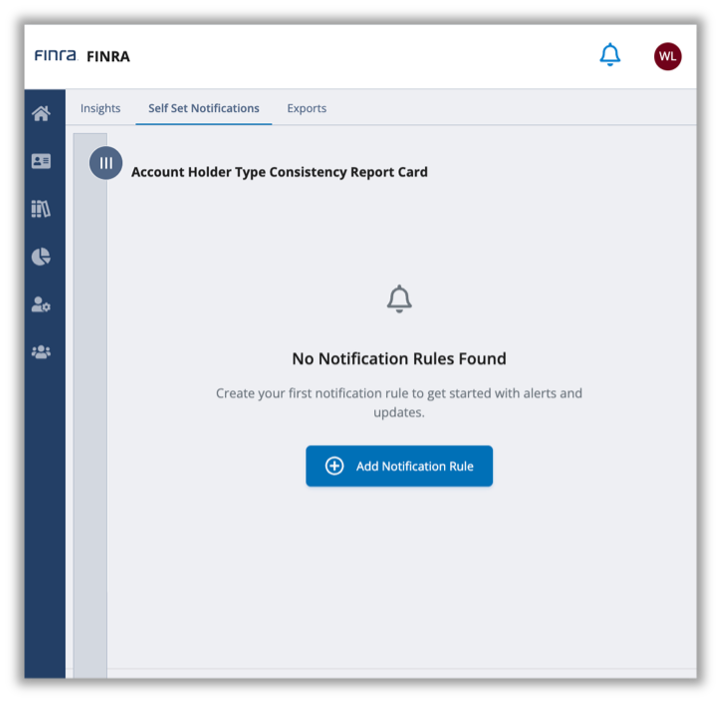
Once selected, a dialogue box will appear that allows you to configure a set of parameters (a “Rule”) that will result in FINRA sending a notification if the conditions of the Rule are met. Specifically, the dialogue box prompts you, on the upper left, to select from two different AHT Consistency Interactive Report Card Metrics: (1) Daily Count of FDIDs with Differing Account Holder Types (“Firm Designated ID Count”); or (2) FDID Non-Compliance Rate vs Peer Firms (“Firm Non-Compliance Rate”).
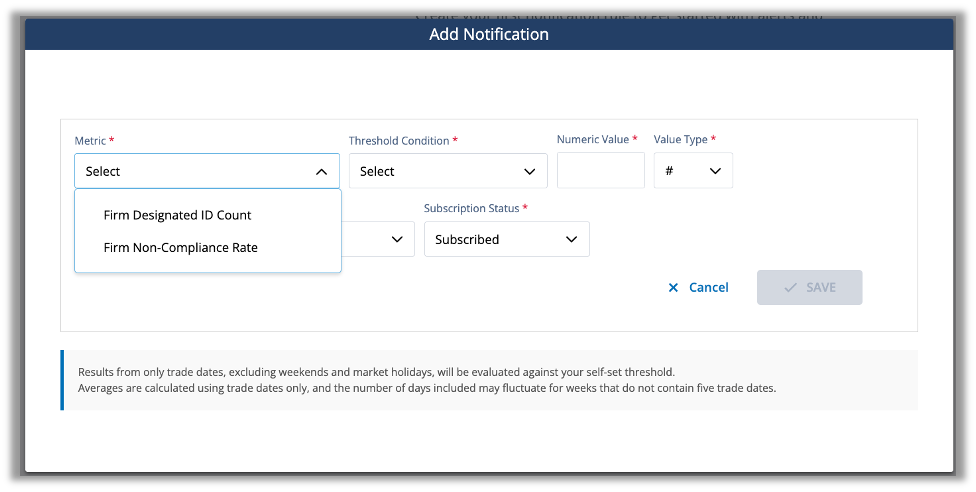
As described above, the Firm Designated ID Count metric reflects the count of FDIDs in a member’s CAT submissions that have an AHT inconsistency on a specific day. Separately, the Firm Non-Compliance Rate reflects the number of FDIDs a member has submitted to CAT on a given day that have an AHT inconsistency over the total number of FDIDs a member submitted to CAT on that day.
Once you select a Metric, there are three inputs that create a Rule related to that Metric: (1) Threshold Condition (2) Numeric Value; and (3) Value Type.
The first input, Threshold Condition, allows you to select from the following values:
- increased by;
- decreased by;
- is equal to:
- is greater than;
- is greater than or equal to;
- is less than; and
- is less than or equal to.
Following the selection of a Threshold Condition, enter a value in the Numeric Value field and define value as a percentage or numeric in the Value Type input. An example of a Rule could be, for the Firm Designated ID Count Metric, if this metric is greater than or equal to 50 instances.
If you select a Threshold Condition of “increased by” or “decreased by”, you can select from the following evaluation periods in the Compared to Previous drop-down.
- day;
- week average;
- month average; and
- three month average.
Once you have finalized the notification criteria, you can configure who is notified when a Rule's criteria are met as well as the notification method. Additionally, you can enable or pause notifications using the Subscription Status drop-down. Specifically, the Notify field is auto-populated with “myself,” but will include the ability to send to a group email if you have the appropriate permissions (see the next section for more details). The Delivery Medium field allows you to select to be notified via email, via the Gateway notification feature (“Web”), or both; and Subscription Status, which defaults to “subscribed” initially and permits you to “unsubscribe” to previously set Rules – giving you the flexibility to pause a rule without deleting it, and then resubscribe at a later date.
Once a Rule is saved, FINRA will evaluate the relevant Metric against your Threshold on the cadence you have set when the underlying data becomes available. When a relevant threshold is met or exceeded, FINRA will notify you using the Delivery Medium you selected. At any time, you can revisit an existing Rule on the Self-Set Notification page to manage existing Self-Set Notification Rules, create new Rules or unsubscribe from Rules. After you unsubscribe from or delete a Rule, FINRA will no longer evaluate a Metric for the Rule that you had created.
Setting up a Group Notification
For organizational efficiency, firms can designate certain users to create custom notifications for groups within their organization, including existing distribution lists or group inboxes. These group notifications operate identically to individual user notifications but reach multiple recipients simultaneously.
To set up a group notification, you must have the Interactive Reports Notification Distribution List entitlement. If you are a Super Account Administrator (“SAA”), you can enable this entitlement for yourself or assign it to a member of your firm. If you are not an SAA, please reach out to your SAA to obtain this credential. Once you have the appropriate entitlement, you can create, change, or delete group notifications.
To create a group notification, complete the Rule setting component (i.e., Metric, Threshold Condition, Numeric Value; Value Type) as outlined above and then in the Notify dialog box select “Other.”
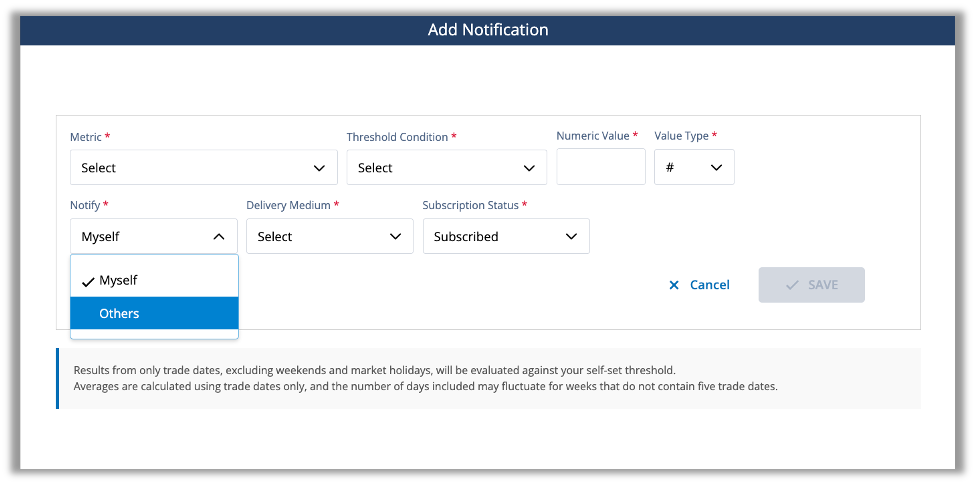
Once you have selected Other, a dialogue box will open called “Distribution Email.”
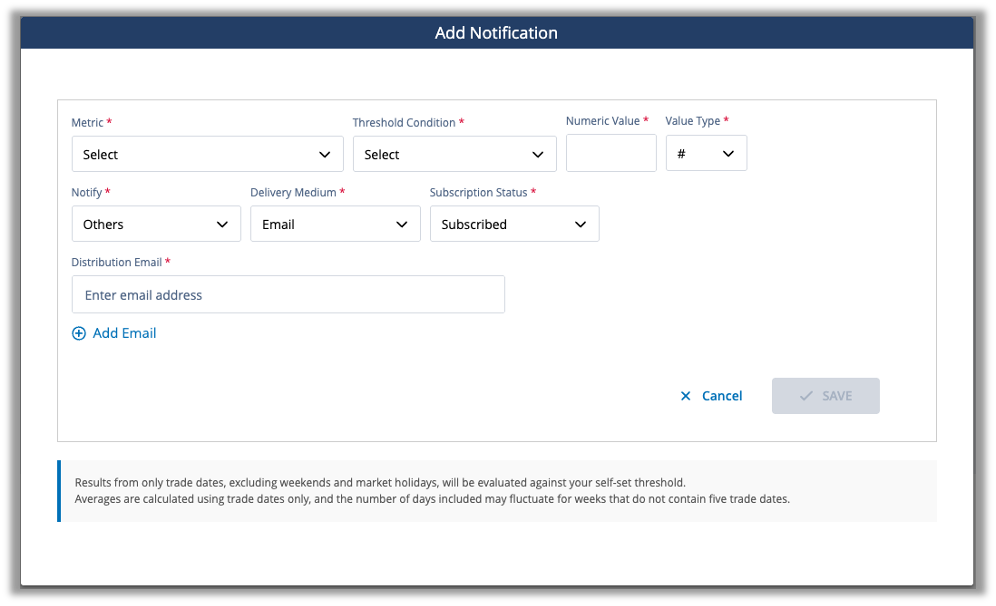
Please enter your desired group email address (e.g., [email protected]) in the Distribution Email free text space. You may enter more than one email address. Once saved, when a relevant threshold is met or exceeded, FINRA will send notifications to this group email address. Users with Interactive Reports Notification Distribution List entitlement can edit or unsubscribe from existing group notifications through the Self-Set Notification navigation tab at the top of the interactive report cards user interface.
Self-Set Notification Reference Table
| Field | Content |
|---|---|
| Metric |
|
| Threshold Condition |
|
| Compared to Previous | When the Threshold Condition “Increased by” or “Decreased by” is selected, an additional comparative value can be selected for the evaluation period:
|
| Numeric Value |
|
| Value Type |
|
| Notify |
* The Others option is only available to users who have the Interactive Reports Notification Distribution List entitlement granted by their firm's Super Account Administrator. |
| Delivery Medium |
|
| Subscription Status |
|
Machine-to-machine daily data capabilities
Members can direct FINRA to make a daily CAT AHT Consistency data file available for automatic download. This file contains details regarding a member’s FDIDs with AHT inconsistencies for the most recently processed day. FINRA uses a machine-to-machine transfer mechanism called fileX: a centralized, secure file transfer platform where firms can send, track and receive files in one place. Please use the following link to find out more about fileX: https://developer.finra.org/fileX
How to set up fileX access for your Account Holder Type Consistency Interactive Report Card:
Setting up fileX access to CAT AHT Consistency data is a three-step process.
Step 1: Request fileX Onboarding: The first step in the fileX onboarding process requires someone at your firm, typically your Super Account Administrator, to contact FINRA Support, and request fileX onboarding. When submitting your request, be sure to specify that you need access for daily data files from the Account Holder Type Consistency Interactive Report Card.
The FINRA Support Center can be contacted using the following:
- Email: [email protected]
- Telephone: (800) 321-6273
- Web portal at https://tools.finra.org/cc_support/
Step 2: Entitlement Configuration: Once your request is submitted, FINRA’s Entitlement Support team will work with your firm to setup File Transfer entitlements, create or update the necessary account, and finally configure File Transfer permissions. Entitlement setup frequently requires a signature from an Authorized Signatory: the Chief Compliance Officer (CCO) or Authorized Officer (or other authorized person) who is currently listed on Schedule A of the organization’s Form BD or the SAA.
The CAT AHT Consistency entitlement details is as follows: Compliance Support Consolidated Audit Trail Data.
- Step 3: Technical Implementation: After entitlements are configured, your firm's technology team can configure its fileX access using the fileX User Guide, with particular focus on the Entitlement & Access Control section. During this implementation phase, your technical team should review authentication methods and certificates, configure secure connection endpoints, set up automated download schedules, establish file storage and processing workflows, test connectivity and file retrieval, and implement error handling and monitoring to ensure reliable data delivery.
Delivery Timing: New files are made available every day for the most recently processed trading day. However, depending on its activity, your firm may not have data every day.
Note: If your firm is considering more than one type of machine-to-machine data access, it is efficient to consolidate your requests into one request, as requesting compliance data sets at different times may require a separate Authorized Signatory signature on a new entitlement request form. As an example, if your firm plans to request machine to machine access to CAT AHT Consistency and TRACE Corporate Bond daily data, please consolidate those requests when engaging with FINRA’s Support Center and Entitlement Support team.
If you have questions, please contact the Report Center admin at [email protected].