
Identity Verification
As of May 11, 2026, FINRA has further enhanced security on the FINRA Entitlement Platform by introducing identity verification through ID.me. The 9-month rollout will first include Super Account Administrators (SAAs), followed by Account Administrators (AAs), and finally by other users with access to specific sensitive information. Account owners will receive notification one-week in advance of activation.
On This Page
- What is Identity Verification?
- Who Needs to Complete Identity Verification
- Timeline
- How to Prepare
- Verification Methods
- User Guides and Resources
- Frequently Asked Questions
What is Identity Verification?
Identity verification is an additional security layer that confirms that you are the legitimate account owner when logging into the FINRA Entitlement Platform—not an imposter attempting unauthorized access. This protects both your account and the sensitive data you access.
Why ID.me? FINRA selected ID.me to perform identity verification because the company is certified to federal standards for this service and offers user support 24/7, 365 days a year.
Who Needs to Complete Identity Verification
The following account types must complete identity verification to maintain access to the FINRA Entitlement Platform:
- Super Account Administrators (SAAs)
- Account Administrators (AAs)
- Users who do not have account administrator access but have access to view specific sensitive data:
- FBI fingerprint results
- Criminal History Record Information (CHRI)
- Social Security numbers (SSNs), or
- Reports or queues containing this sensitive data
Note: IA-only organizations only have SSN-related requirements.
Exclusions: FinPro accounts and machine accounts are currently excluded.
Timeline
When Will Identity Verification Start?
The rollout follows a 9-month phased approach, with the schedule order based on type of organization and user types, with SAAs first, followed by AAs, and finally, in-scope users.
Beginning May 11, 2026 – for new and existing accounts of Investment Adviser Firms, Service Providers, & Regulators.
Beginning September 28, 2026 – for new and existing accounts of the Broker-Dealer (BD) community, that includes BD and Joint BD/IA firms and Funding Portals.
Not all users within the same organization may verify on the same date. Users with multiple accounts may verify each account on a different date.
Account owners will receive an email notification one week prior to the identity verification requirement.
Note: If your organization would like to activate identity verification earlier than the timeline shown above, as an SAA, send a request to [email protected].
How to Prepare
To prepare for identity verification:
- Gather required documents: Have a valid government-issued ID ready (driver's license, passport, or state ID) and your social security number available.
- Prepare your technology: Ensure access to a smartphone with a camera and stable internet connection for capturing selfies or participating in a live video call.
- Set up your environment: Position yourself in a well-lit area with a solid, dark background to capture clear photos of your ID.
- Verify your account information: Review your FINRA Entitlement account to confirm your account name is correctly associated with you. To ensure a smooth verification process, make sure your first and last name in your FINRA Entitlement account is close to your legal name. (middle name is not required for identity verification)
- Review user access permissions: SAA or AA should verify that in-scope users require the access to perform their current job functions. If the level of access is not needed, the SAA or AA should remove the entitlement from their account.
- Review your service providers: If a firm uses a service provider and they have a FINRA Entitlement account, the SAA or AA should work with the service provider to verify that the FINRA Entitlement account is assigned to a single person and that their information is current and accurate.
- Set up only one account: Do not create multiple accounts with ID.me. Only one ID.me account should be used to verify each of your FINRA entitlement accounts.
- Use your personal email: Only personal, and not business email addresses are needed to verify your identity.
Verification Methods
You should not create multiple accounts with ID.me. One ID.me account will be used to verify your FINRA Entitlement accounts and you should use your personal email address and not your business email.
- Self-Service Verification (Most Users):
Identity verification is accomplished through self-service identity verification for those individuals who have an existing pre-verified ID.me account and those individuals who need to create an ID.me account.- Existing, pre-verified ID.me users: Use your pre-verified ID.me account to login to ID.me and submit a video selfie. ID.me will match the uploaded selfie to your profile to complete the identity verification requirement.
- New ID.me users: Create an ID.me account by uploading your documents and take/submit a video selfie. As part of this process, you will need to provide your social security number and personal information for automated verification.
- Video Chat Verification (Some Users):
For those unable to complete self-service verification, including if you live outside the United States, you may verify your identity through a live video chat with an ID.me trusted agent who will review your government-issued documents in real time. - In-Person Verification (Rare Cases):
In limited circumstances, you may complete identity verification on a kiosk at a UPS store or one of over 700 ID.me locations nationwide by presenting your government-issued documents to a trusted operator. The in-person data is handled the same way as remote verification.
To complete identity verification, users must provide their date of birth to FINRA. This information serves as a matching identifier between the FINRA Entitlement Platform and ID.me. FINRA does not store or retain any personal information submitted to or provided by ID.me during the verification process.
For details of the identity verification options, please refer to the User Guides and Overview material below.
User Guides and Resources
Step By Step Guide – Verifying Your Identity with Self Service (PDF)
Step By Step Guide – Verifying Your Identity on an Extended Video Call (PDF)
Identity Verification Overview
Frequently Asked Questions
Understanding the Requirement
Q1: Why has FINRA implemented ID.me?
A1: FINRA is requiring identity verification to protect certain data from being exposed to security vulnerabilities and to evolve its cybersecurity controls to mitigate fraud. FINRA is required to follow federal and state obligations to prevent unauthorized access.
Q2: What are the benefits of using ID.me as FINRA's identity verification method?
A2: ID.me offers the following benefits:
- Provides 24/7 U.S.-based support - Access round-the-clock customer support for any login assistance you may need. Visit help.id.me for more information.
- Prevents fraud - ID.me has a robust identity verification service to help prevent fraud and identity theft by ensuring the appropriate user accesses the account.
- Offers bank-grade security - ID.me uses advanced encryption to keep your personal information safe and secure.
- Meets federal standards - ID.me meets the requirements for Identity Assurance Level 2 (IAL2) verification.
Q3: What sensitive data access will require identity verification?
A3: Super Account Administrators and Account Administrators are required to complete identity verification. In addition, user accounts with access to view FBI fingerprint results, RAP sheet data, fingerprint-related data in reports and queues, or Social Security numbers (SSNs) will require identity verification.
Q4: Is there a cost for an ID.me account?
A4: No. There is no cost assessed to FINRA users for identity verification.
Implementation Timeline and Scope
Q5: How do I begin the identity verification process for FINRA?
A5: You will receive an email one week prior to your identity verification start date for each account that you own. Start dates may vary for each account. On or after the identity verification start date for your account, you will see a screen prompt after logging into the FINRA Entitlement Platform that will direct you to ID.me to begin the verification process.
NOTE: You will only see a screen prompt to ID.me on or after the start date of your identity verification date. You cannot verify your identity before the start date.
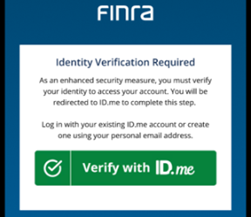
Q6: When I log into FINRA systems, I do not see the "Verify with ID.me" button to complete identity verification. Why is it not showing?
A6: FINRA is implementing identity verification through a phased rollout for existing accounts that meet certain criteria (see FAQ #3). If you meet one or more of the criteria and do not see the "Verify with ID.me" button, it is because the verification requirement has not yet been set for that account. You will receive an email one week before the requirement is set for that account. If you have multiple accounts, each account may require verification at different times through the roll-out period. If you would like to complete identity verification early for one or more accounts, please email [email protected] and include your username(s).
Q7: What events require me to verify identity?
A7: Identity verification is currently required:
- Upon initial enrollment
- Every two years
- When a new account is created or modified that meets the identity verification criteria
- As required by FINRA
Q8: Do users that meet the identity verification criteria and are with organizations that use single sign-on (SSO) to access a FINRA system need to complete identity verification?
A8: Yes. Users that meet the identity verification criteria and who are with organizations leveraging SSO must complete identity verification when prompted to access FINRA systems.
Q9: As a firm or service provider, do I need to verify my identity for each of my accounts?
A9: Yes. You will need to verify your identity for each of your FINRA Entitlement accounts that meets the criteria for identity verification. Service providers should verify that their FINRA Entitlement account name is correct and work with the firm's SAA or AA to update the account name as appropriate. To ensure a smooth verification process, make sure your first and last name in your FINRA Entitlement account(s) is close to your legal name. (middle name is not required for identity verification)
Preparing for Verification
Q10: As a U.S. citizen, what do I need to complete the identity verification process through ID.me?
A10: You will need:
- A smartphone with a camera or computer/tablet with a webcam
- A photo ID (U.S. driver's license or state ID, U.S. passport, or U.S. passport card)
- Your Social Security number
At times, a secondary document may be required. If so, you will need an artifact such as a Social Security card, utility bill, or vehicle registration information to verify residency.
Q11: What do I need to complete verification through ID.me Self-Service (i.e., no video call or human intervention)?
A11: You will need:
- A smartphone with a camera or computer/tablet with a webcam
- A photo ID (U.S. driver's license or state ID, U.S. passport, or U.S. passport card)
- Your Social Security number
- A live photo of your face with your phone camera or a webcam
Q12: As a non-U.S. resident living in the USA, what do I need to complete the ID.me verification process?
A12: You will need:
- A smartphone or computer/tablet with a webcam
- A valid foreign (non-U.S.) passport or state-issued driver's license or ID
- A video call with ID.me to complete identity verification
Note: ID.me supports over 20 languages in Self-Service. For more information, visit Verifying in a language other than English.
Q13: As a non-U.S. citizen living internationally, what do I need to complete the ID.me verification process?
A13: You will need:
- A smartphone or computer/tablet with a webcam
- A valid foreign (non-U.S.) passport
- Proof of your international address. Commonly used, eligible documents include bank statements, utility bills, valid and unexpired driver’s licenses, pay stubs.
- A video call with ID.me to complete identity verification
Note: ID.me supports over 20 languages in Self-Service. For more information, visit Verifying in a language other than English.
Q14: As a non-U.S. citizen living internationally, what do I need to verify my identity?
A14: To verify your identity as a non-U.S. citizen, follow the instructions below.
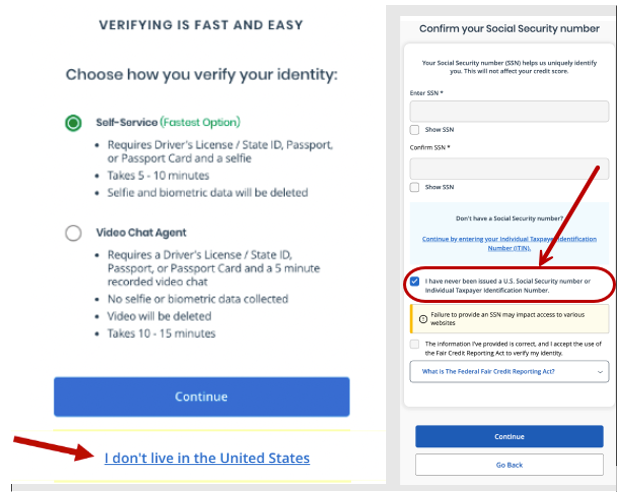
When the screen below appears while completing identity verification, select the I don’t live in the United States hyperlink. Do not select Self-Service or Video Chat Agent. Once you enter your personal information through the workflow, you will need to confirm that you do not have a SSN or ITIN. You will then enter your passport information, upload passport and address documents (See FAQ13) before joining a video call to complete the identity verification process.
Q15: My state-issued driver's license or identification card (ID) has expired. Can I still verify my identity through ID.me?
A15: Yes. You can use your expired driver's license or state-issued identification card as evidence to prove your identity through ID.me. Depending on individual circumstances, you may be able to complete identity verification through standard verification or be required to upload additional documents.
- For standard verification: If your license expired recently (often within 12 months), upload the expired ID plus a photo of your valid temporary license or renewal confirmation from the applicable state licensing agency (e.g., Department of Motor Vehicles).
- If rejected for being expired: Choose the "Expired U.S. State Driver's License" option in ID.me, upload the expired ID, then upload your temporary/renewal document.
- For other documents: If you have other valid government IDs (like a passport or current state ID), use one of those instead as a primary document.
Q16: What tips or best practices are there for taking photos (selfie) with a phone?
A16: You can locate tips and best practices for taking photos (selfie) with your phone on the ID.me website. For the best results, take photos in a well-lit area with no glare, ensuring your face is clearly visible and centered in the frame.
Q17: Is a selfie captured when an individual goes through a remote supervised (Trusted Referee) video call?
A17: Yes. You must first complete a selfie before proceeding to the remote supervised (Trusted Referee) video call.
Q18: Is a selfie captured when an individual does an in-person verification?
A18: Yes. During an in-person verification session (e.g., at a participating kiosk), the individual will authenticate using their registration code and will be prompted to take a selfie before capturing their identity documents. This selfie and the documents are then reviewed by a proofing supervisor on site and by an ID.me document reviewer.
Q19: Can I request my selfie be deleted from ID.me?
A19: Yes, you can request that your selfie be deleted in ID.me through ID.me Privacy Rights Center. The selfie is removed within seven days and does not affect your verified status or credential. The only time ID.me retains your selfie after a request to delete is made is when there is a legal obligation to keep it or an active fraud concern.
To delete your selfie:
- Sign in to your ID.me Wallet.
- Select Sign in & Security from the top menu.
- Click Privacy in the side menu.
- Under Manage my data, select Remove my data.
- Choose Delete my selfie and confirm the deletion.
Delete selfies and biometric information
Completing the Verification Process
Q20: How do I know if I have an ID.me account?
A20: You can login or recover any existing ID.me user account from the ID.me website by entering the email you used to set up the account and complete the recovery process. If you have an ID.me account, when you login it should also display to which ID.me partners you have connected your account.
Q21: I already have an ID.me account to access the Social Security Administration or IRS site. Can I use this account?
A21: Yes. A user only has one ID.me account. If you already have an ID.me account, you must use your existing credentials. Do not create a new account. If you accidentally create a new account, you must either merge the account or delete the duplicate account. If you do not have an ID.me account, you must create one when prompted.
Q22: What email should I use when I create an ID.me account?
A22: When creating an ID.me account, use your personal email address rather than a work or organizational email. Here's why:
- Your ID.me account verifies your individual identity and is used for purposes outside your organization
- ID.me uses your registered email for account recovery and credential verification
- Using a personal email ensures you maintain access even if you change organizations
Q23: What is the identity verification process if I already have an ID.me account?
A23: If you have an existing ID.me account, log in to ID.me using your existing ID.me credentials. You will need to confirm account ownership via the multi-factor authentication (MFA) method you previously set up on your ID.me account (e.g., by entering a verification code sent to your phone or by using the ID.me Authenticator app). Next, you will be prompted to upload a selfie to confirm your identity. Once you've completed these steps, you will need to allow ID.me to share your verified information with FINRA. View the Presentation above for more detailed information.
Q24: How can I confirm that my name has been captured correctly in ID.me?
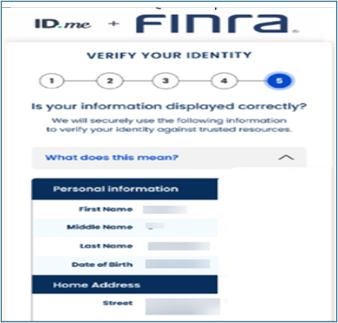
A24: It is important that you take time to review the information that ID.me presents to you during the identity verification process. In rare cases, your name, date of birth (DOB), or other information may be captured incorrectly (e.g., first name and middle name together as first name) as part of populating data from the uploaded evidence.
Multi-Factor Authentication (MFA) for ID.me
Q25: Will I need to install the ID.me Authenticator on my phone before I first verify my identity?
A25: No. The ID.me Authenticator is an app that can be used as an MFA option to complete the MFA requirement to access your ID.me account once it is created. ID.me account verification can also occur via other MFA options such as a text message or phone call. To install the app for iOS devices, go to the App Store. For Android devices, go to the Google Play Store.
Q26: Can a security key that is used for Multi Factor Authentication (MFA) through Duo be used to complete the ID.me MFA requirement?
A26: Yes. The same security key can be used as the MFA option for both Duo and ID.me. Users with an existing security key can add ID.me as the MFA method for their ID.me multi-factor requirement. Any security key used for MFA must be compatible with the WebAuthn/FIDO2 standard.
Data Sharing and Privacy
Q27: Do I need to share my data with FINRA to complete my FINRA verification?
A27: Yes. Once you complete the identity verification process with ID.me, you must allow for sharing specific verification data and verification status with FINRA to complete identity verification for your FINRA Entitlement account.
Q28: What data will be transmitted to FINRA from ID.me when I complete my identity verification and select 'Allow'?
A28: Your first and last name, date of birth, and verification timestamp will be transmitted to FINRA when you confirm your identity.
Q29: Do I need to share my date of birth (DOB) with FINRA?
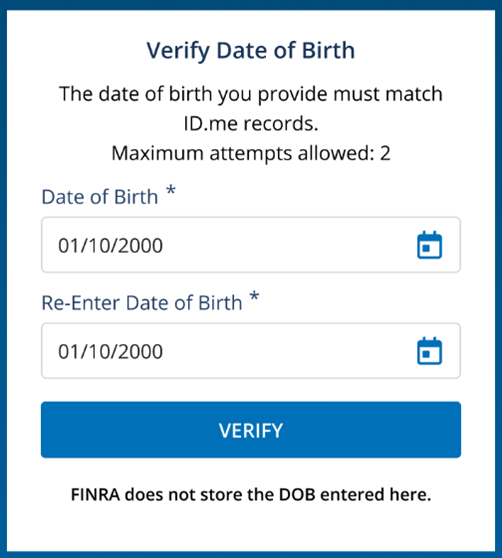
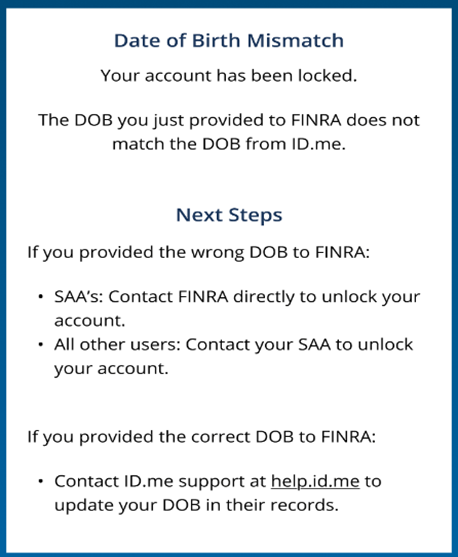
A29: Yes. You will need to provide your DOB to FINRA as it is used to match against the DOB captured and verified through ID.me. FINRA will not store your DOB from the Verify Date of Birth screen and will only use it during the identity verification process. You will be required to enter your DOB and then re-enter it to validate accuracy. Your account will be locked if the DOB you entered does not match the DOB on file with ID.me. See Next Steps on screen below.
Troubleshooting
Q30: I successfully completed my ID.me verification, but why did I receive a message indicating that there is a 'Name Mismatch' on the FINRA Entitlement Platform?
A30: If you completed identity verification through ID.me but received a Name Mismatch error, this means the information in your FINRA Entitlement account (first and last name) is not close to what was verified through ID.me.
To resolve this issue:
For first and/or last name mismatch:
- First, check your FINRA Entitlement account to confirm that your name is correct
- If your name needs to be updated in FINRA, contact your SAA or an AA at your organization to update your name
- If your FINRA Entitlement account name is correct, check your ID.me account
- If your name in ID.me needs to be corrected, contact ID.me for assistance
Q31: As an SAA, what is the easiest way to update my name on my FINRA Entitlement account?
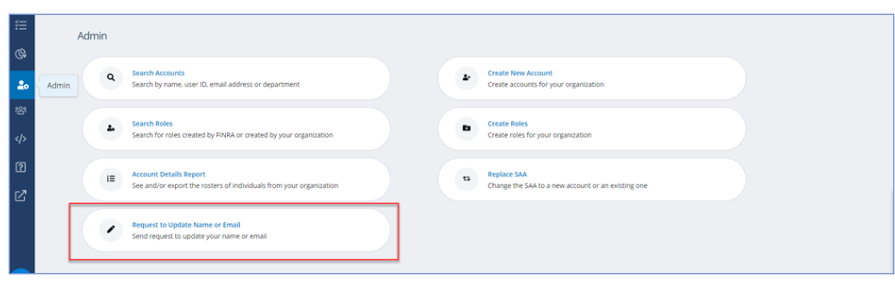
A31: SAAs should use the Update/Replace workflow to update their name and/or email address. This workflow guides the SAA step-by-step through the request process. While most requests will process automatically once approved by an Authorized Signatory, there are circumstances that require a request to route to the FINRA Entitlement Group for review, research, and validation prior to fulfillment. The workflow sends a corresponding email to the Requester and Authorized Signatory once it is completed.
Q32: I'm having issues creating or using my ID.me account. Who can I contact for support?
A32: For help with your ID.me account, go to help.id.me or go to Contact Support to chat with ID.me or submit a help request in the "How Can We Help" search bar. ID.me support service is available 24 hours a day, 365 days a year.
Future Enhancements
Q33: Will identity verification expand into other areas of the FINRA Entitlement Program in the future?
A33: Yes, it is envisioned that identity verification will expand in the future. For example, FINRA will use identity verification to replace security questions for users who meet the criteria for identity verification. For individuals who are out-of-scope for identity verification, DUO will be used to validate account recovery—for example, a Duo Push notification will be presented.
Need Additional Help?
- For ID.me technical issues: Contact ID.me support at help.id.me (available 24/7/365)
- For FINRA Entitlement account questions: Contact your System Account Administrator (SAA) or Authorized Administrator (AA)